
HP Graphics Server Blade RedHat Enterprise Linux Quick Start

6
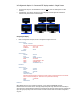
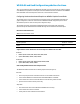
X Configuration Option 3 - TwinView display method – Dual Screen
In Twin View – the “taskbar” will span only one display, and when application windows are maximized they
will only maximize to a single display (not across multiple displays).
TwinView is a mode of operation where two display devices (digital flat panels, CRTs) can display the
contents of a single X screen in different configuration. This method of multiple monitor use has several
distinct advantages over other techniques. (such as Xinerama, not supported by RGS)
Section "ServerFlags"
Option "Xinerama" "0"
EndSection
A single X screen is used. The NVIDIA driver conceals all information about multiple display devices from
the X server; as far as X is concerned, there is only one screen.
Both display devices share one frame buffer. Thus, all the functionality present on a single display (e.g.,
accelerated OpenGL) is available with TwinView.
No additional overhead is needed to emulate having a single desktop.
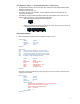
Configuring TwinView Display
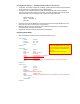
Below is configuration example, red text is configuration change to focus on.
Section "Monitor"
Identifier "Monitor0"
HorizSync 30.0 - 110.0
VertRefresh 50.0 - 150.0
Option "DPMS“
EndSection
Section "Device"
Identifier "Device0"
Driver "nvidia"
VendorName "NVIDIA Corporation“
BusID "PCI:19:0:0"
Option "ConnectedMonitor" "DFP-0,DFP-1”
#Option "UseDisplayDevice" "none"
#Option ”UseEDID" "false"
Option "CustomEDID" "DFP-0:/etc/X11/lp2465edid.bin; DFP-1:/etc/X11/lp2465edid.bin"
Option "AllowSHMPixmaps" "1"
EndSection
Section "Screen"
Identifier “Screen0"
Device "Device0"
Monitor "Monitor0"
DefaultDepth 24
### Dual-monitor (headless) configuration:
Option "TwinView" "True“
Option "MetaModes" "CustomEDID" "DFP-0:/etc/X11/19edid.bin; DFP-1:/etc/X11/19edid.bin"
SubSection "Display“
Depth 24
EndSubSection
EndSection
Note: “ConnectionMonitor” “CRT-0, CRT-
1” will no longer work. Most new nVidia
drivers only support a single CRT device
per card.
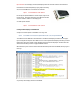
You can see this in the Xorg.0.log