
HP Graphics Server Blade RedHat Enterprise Linux Quick Start

3
X Configuration Option 1 - Virtual display method – Single Screen
The Virtual display method is the easiest to setup (Note – RGS does not support Match Receiver Display
Resolution with this method)
One screen size only per xorg.conf
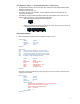
The “taskbar” will span across all displays, and when application windows are maximized they will
maximize across all displays.
Virtual display can support LARGE virtual display limited only by frame buffer memory. Even if you use
multiple monitors it will be one “screen” stretched across all displays.
o Single client display with standard sizes like 1680x1050
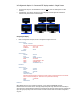
o Multiple client display acting as single monitor with the “screen” stretched across all of them. Up
to 4 display with total resolution of 6720x1050.
Configuring Virtual Display
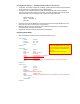
Below is configuration example, red text is configuration change to focus on.
Section "Monitor"
Identifier "Monitor0"
HorizSync 30.0 - 110.0
VertRefresh 50.0 - 150.0
Option "DPMS“
EndSection
Section "Device"
### Set the Option "UseDisplayDevice" "none" in this section
### and specify a specific resolution in the Screen section below
### using the "Virtual" attribute. This mechanism is very flexible
### in adjusting to unusual resolutions, but it offers no capability
### for dynamic resizing and Resolution Matching.
Identifier "Device0"
Driver "nvidia"
VendorName "NVIDIA Corporation"
BusID "PCI:19:0:0"
Option "UseDisplayDevice" "none"
Option "UseEDID" "false"
Option "AllowSHMPixmaps" "1"
EndSection
Note: BusID is very likely to be modified by the graphics_config init script at boot time on blades. Explained in example
configuration section to follow.
Section "Screen"
Identifier "Screen0"
Device "Device0"
Monitor "Monitor0"
DefaultDepth 24
SubSection "Display“
### When using "UseDisplayDevice" "none" in the Device Section,
### you must specify a Virtual resolution here.
### Any Modes you specify will be ignored.
Virtual 3360 1050
Depth 24
EndSubSection
EndSection