
HP Graphics Server Blade RedHat Enterprise Linux Quick Start



2
Purpose of this document
Provides an overview of the configuration steps for setting up RHEL with HP RGS on HP WS460c Graphics
Server
Skill Set
The installer should be familiar with Linux and basic X server configuration as well as HP BladeSystems,
WS460c Graphics Server Blade G6 and/or Gen8, and HP RGS.
Prerequisite Recommend Reading
Please read “Hardware Accelerated Graphics for Desktop Virtualization” for a detailed conceptual overview
of the overall solution before proceeding.
This document can be found at: http://h71028.www7.hp.com/enterprise/downloads/4AA4-1701ENW.pdf
Overview of Linux configuration options for WS460c with
RGS
Linux X Server configuration options
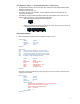
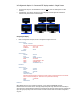
The WS460c Graphics server blade does not have physically attached displays, because of this, the X server
requires special configuration. There are three ways to configure the X-server.
1. Virtual display method - A single screen size using the “Virtual” Display option
2. Connected CRT display method - A single screen using “ConnectedMonitor” “CRT” to fake the driver into
thinking there is a CRT attached.
3. TwinView display method - “TwinView” - using DFP Extended display identification data (EDID)