
HP Graphics Server Blade RedHat Enterprise Linux Quick Start
17
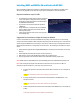
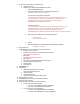
15. Remove old xorg.conf file, after making sure you have a backup.
16. Create a new script in /etc/init.d that will automatically detect what mode you are in and change to the
appropriate xorg file.
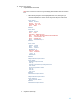
f. On Gen8 Systems
i. Create new file with vi called VID_CHANGE
# vi /etc/init.d/VID_CHANGE
1. Add the following lines to file:
#!/bin/sh
if lspci |grep 'Matrox';then
ln -sf /etc/X11/xorg.MATROX /etc/X11/xorg.conf
else
ln -sf /etc/X11/xorg.NVIDIA /etc/X11/xorg.conf
fi
ii. Add Exec permissions to the file
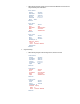
g. On G6 Systems
i. Create new file with vi called VID_CHANGE
# vi /etc/init.d/VID_CHANGE
ii. Add the following lines to file:
#!/bin/sh
if lspci |grep '';then
ln -sf /etc/X11/xorg.ATI /etc/X11/xorg.conf
else
ln -sf /etc/X11/xorg.NVIDIA /etc/X11/xorg.conf
fi
iii. Add exec permissions to file
17. Create a new symbolic link in /etc/rc5.d and give it is a low S number. In our case we use S03…
h. From rc5.d directory run
# ln –s ../init.d/VID_CHANGE S03VID_CHANGE
18. Make sure the file named xorg.conf was deleted from /etc/X11
19. Reboot
** This configuration will load appropriate driver depending on what video mode you are in.