
HP Graphics Server Blade RedHat Enterprise Linux Quick Start
16
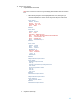
i. Make following changes, making sure you customize the BusID line in “device”section
using the PCI ID you recorded earlier.
Section "Monitor"
Identifier "Monitor0"
VendorName "Unknown"
ModelName "Unknown"
HorizSync 28.0 - 33.0
VertRefresh 43.0 - 72.0
Option "DPMS"
EndSection
Section "Device"
Identifier "Device0"
Driver "mga"
VendorName "Matrox Graphics"
BusID "PCI:01:00:1"
Option "UseEDID""false"
EndSection
Section "Screen"
Identifier "Screen0"
Device "Device0"
Monitor "Monitor0"
DefaultDepth 24
SubSection "Display"
Depth 24
Modes "1024x768" "800x600"
EndSubSection
EndSection
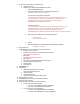
e. Xorg.ATI (G6 only)
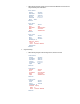
i. Make following changes to the following sections, attention to bus ID.
Section "Monitor"
Identifier "Monitor0"
VendorName "Unknown"
ModelName "Unknown"
HorizSync 28.0 - 33.0
VertRefresh 43.0 - 72.0
Option "DPMS"
EndSection
Section "Device"
Identifier "Device0"
Driver "radeon"
VendorName "ATI Corporation"
BusID "PCI:01:03:0"
Option "UseEDID""false"
EndSection
Section "Screen"
Identifier "Screen0"
Device "Device0"
Monitor "Monitor0"
DefaultDepth 24
SubSection "Display"
Depth 24
Modes "1024x768" "800x600"
EndSection