
HP Graphics Server Blade RedHat Enterprise Linux Quick Start
15
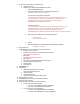
14. Configure xorg.conf files
c. Xorg.NVIDIA (Both G6 and Gen8)
NOTE: There is a section on bottom of xorg file adding by RGS installation that must remain in
tack.
i. Make following changes in sections highlighted below in red, making sure you
customize the BusID line in “device”section using the PCI ID you recorded earlier.
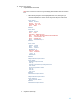
Section "Monitor"
Identifier "Monitor0"
HorizSync 30.0 - 110.0
VertRefresh 50.0 - 150.0
Option "DPMS"
EndSection
Section "Device"
Identifier "Device0"
Driver "nvidia"
VendorName "NVIDIA Corporation"
BusID "PCI:33:00:0" ### MUST CHANGE PCI ID FOR YOUR CARD
Option "ConnectedMonitor" "CRT"
Option "UseEDID" "false"
Option "AllowSHMPixmaps" "1"
EndSection
Section "Screen"
Identifier "Screen0"
Device "Device0"
Monitor "Monitor0"
DefaultDepth 24
SubSection "Display"
Modes "2560x1600"
Depth 24
EndSubSection
EndSection
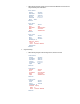
# Begin HP Remote Graphics Software
Section "Module"
# HP Remote Graphics Extension
Load "rge"
# extmod recommended for preventing XID overflow.
Load "extmod"
# Ensure X.org defaults are loaded
Load "glx"
Load "dbe"
Load "record"
EndSection
# End HP Remote Graphics Software
# Begin HP Remote Graphics Software
Section "Extensions"
Option "Composite" "Disable"
EndSection
# End HP Remote Graphics Software
d. Xorg.Matrox (Gen8 only)