
HP Graphics Server Blade RedHat Enterprise Linux Quick Start
14
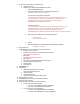
5. Log into system with SSH from a client like PUTTY.
a. Change run level to 3.
b. On RHEL 6 only, disable the default RHEL Nouveau driver.
i. Edit /boot/GRUB/GRUB.conf file
ii. On the line beginning with ‘kernel’, append the following string:
rdblacklist=nouveau nouveau.modeset=0
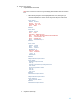
As an example, the original line may look like:
kernel /vmlinuz-2.6.32-220.el6.x86_64 ro root=/dev/mapper/VolGroup-lv_root
rd_NO_LUKS LANG=en_US.UTF-8 rd_NO_MD rd_LVM_LV=VolGroup/lv_swap
SYSFONT=latarcyrheb-sun16 rhgb quiet rd_LVM_LV=VolGroup/lv_root
KEYBOARDTYPE=pc KEYTABLE=us rd_NO_DM
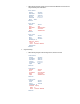
It would be changed to:
kernel /vmlinuz-2.6.32-220.el6.x86_64 ro root=/dev/mapper/VolGroup-lv_root
rd_NO_LUKS LANG=en_US.UTF-8 rd_NO_MD rd_LVM_LV=VolGroup/lv_swap
SYSFONT=latarcyrheb-sun16 rhgb quiet rd_LVM_LV=VolGroup/lv_root
KEYBOARDTYPE=pc KEYTABLE=us rd_NO_DM rdblacklist=nouveau nouveau.modeset=0
iii. Edit /etc/modprobe.d/blacklist.conf and add following lines
blacklist nouveau
options nouveau modeset=0
iv. Reboot
v. After reboot make sure nouveau driver is not installed by running:
>modprobe –r nouveau
6. Goto /tmp directory
7. Install NVIDIA driver, in this example we are using version 304.60
a. Be sure you are in run level 3
b. You should have the install file, in this example our file name is:
NVIDIA-Linux-x86_64-304.60.run
c. Run installer
#sh NVIDIA-Linux-x86_64-304.60.run
d. Accept License
e. Accept 32-bit compatibility OpenGL libraries if prompted.
f. Accept to update X configuration file
g. Complete Setup.
h. Don’t reboot yet.
8. DON’T REBOOT YET
9. Install HP RGS.
a. After unpacking the RGS bits, run installer:
Run “# sh lin64/sender/install.sh”
b. Accept agreement
c. Accept customizations
d. Don’t Start X yet, even though installer states it.
10. Change directory to /ext/X11
11. Create BACKUP copies of the xorg.conf created by installers
12. Change directory to /ext/X11
13. Create two copies of the xorg.conf created by installers
a. If on G6, create the two following files.
i. # cp xorg.conf xorg.NVIDIA (Creates file xorg.NVIDIA)
ii. # cp xorg.conf xorg.ATI (Creates file xorg.ATI)
b. If on Gen8, create the two following files.
i. # cp xorg.conf xorg.NVIDIA (Creates file xorg.NVIDIA)
ii. # cp xorg.conf xorg.MATROX (Creates file xorg.MATROX)