
HP Graphics Server Blade Microsoft RemoteFX vGPU Quick Start

Technical white paper | HP Hardware Accelerated Graphics for Desktop Virtualization
6
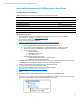
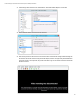
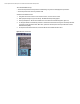
21. In VM settings, under “Hardware” click “Add Hardware > RemoteFX 3D Video Adapter” and click add.
22. Select maximum number of monitors and max resolution.
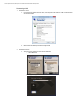
23. After reboot you will see a black screen on the virtual machine console with the message “Video Remoting was
disconnected. The virtual machine is using the 3D video adaptor, which is not supported by the Virtual Machine
Connection console.” This is expected, and you will not be able to log on to the virtual machine from the Virtual
Machine Connection.