
HP Graphics Options for HP ProLiant WS460c Gen8 Spare Customer Installation Instructions

Step 4. WS460c Mezzanine
Assembly Replacement
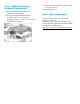
• Remove the Mezzanine Assembly to be
installed from the ESD bag.
• Replace the failed WS460c Mezzanine
Assembly with the new replacement
assembly. Tighten the 3 captive screws using
a TORX T10 screwdriver.
• Reinstall any other Mezzanine cards removed
for access in step 3.
• Reinstall the top cover.
Step 5. More Information
For more detailed setup and configuration
information as well as
regulatory, safety, and environmental notices,
see the HP ProLiant WS460c Workstation Blade
User Guide on the HP website
http://hp.com/go/bladesystem/documentation
.