
HP ProLiant WS460c G6 Workstation Blade with WS460c Graphics Expansion Blade User Guide


Troubleshooting 82
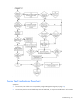
NOTE: For the location of server LEDs and information on their statuses, refer to the server
documentation.
Possible causes:
• Improperly seated or faulty internal or external component
• Unsupported component installed
• Redundancy failure
• System overtemperature condition
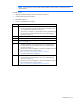
Item See
1
•
"Integrated Management Log (on page 63)" or in the HP ProLiant
Servers Troubleshooting Guide located on the Documentation CD or
see "Troubleshooting resources (on page 67)"
•
"Event list error messages" in the HP ProLiant Servers Troubleshooting
Guide located on the Documentation CD or see "Troubleshooting
resources (on page 67)"
2
"Component identification (on page 6)"
3
System Management Homepage (https://localhost:2381)
4
"Power-on problems flowchart ("Server blade power-on problems
flowchart" on page 75)"
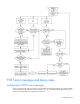
5
•
"Hardware problems" in the HP ProLiant Servers Troubleshooting
Guide located on the Documentation CD or see "Troubleshooting
resources (on page 67)"
•
Maintenance and service guides for c-
Class server blades, located on
the Documentation CD or the HP website
(http://www.hp.com/go/bladesystem/documentation)
•
"HP contact information (on page 95)"
6
•
"Hardware problems" in the HP ProLiant Servers Troubleshooting
Guide located on the Documentation CD or see "Troubleshooting
resources (on page 67)"
•
Maintenance and service guides for c-
Class server blades, located on
the Documentation CD or the HP website
(http://www.hp.com/go/bladesystem/documentation)