
HP ProLiant WS460c G6 Workstation Blade with WS460c Graphics Expansion Blade User Guide


Troubleshooting 80
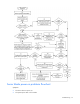
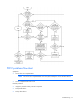
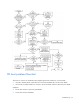
Possible causes:
• Corrupted OS
• Hard drive subsystem problem
• Incorrect boot order setting in RBSU
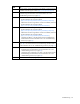
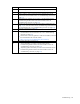
Item See
1
HP ROM-Based Setup Utility User Guide
(http://www.hp.com/servers/smartstart)
2
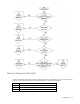
"POST problems flowchart (on page 77)"
3
•
"Hard drive problems" in the HP ProLiant Servers Troubleshooting
Guide located on the Documentation CD or see "Troubleshooting
resources (on page 67)"
•
Controller documentation
4
"HP Insight Diagnostics (on page 63)" or in the HP ProLiant Servers
Troubleshooting Guide located on the Documentation CD or see
"Troubleshooting resources (on page 67)"
5
•
"Loose connections (on page 71)"
•
"CD-ROM and DVD drive problems" in the HP ProLiant Servers
Troubleshooting Guide located on the Documentation CD or see
"Troubleshooting resources (on page 67)"
•
Controller documentation
6
"General memory problems are occurring" in the HP ProLiant Servers
Troubleshooting Guide located on the Documentation CD or see
"Troubleshooting resources (on page 67)"
7
•
"Operating system problems" in the HP ProLiant Servers
Troubleshooting Guide located on the Documentation CD or see
"Troubleshooting resources (on page 67)"
•
"HP contact information (on page 95)"
8
•
"Hardware problems" in the HP ProLiant Servers Troubleshooting
Guide located on the Documentation CD or see "Troubleshooting
resources (on page 67)"
•
Maintenance and service guides for p-Class
server blades, located on
the Documentation CD or the HP website
(http://www.hp.com/products/servers/proliant-bl/p-class/info)
•
Maintenance and service guides for c-
Class server blades, located on
the Documentation CD or the HP website
(http://www.hp.com/go/bladesystem/documentation)
9
"General diagnosis flowchart (on page 73)"