
HP ProLiant WS460c G6 Workstation Blade with WS460c Graphics Expansion Blade User Guide

Hardware options installation 46
15.
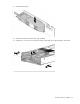
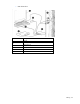
Install the hard drive backplane. Press down on the hard drive backplane retainer to seat the board.
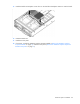
16. Install the hard drives.
17. Install the access panel.
18. If necessary, reinstall the WS460c Graphics Expansion Blade ("Remove the WS460c Graphics
Expansion Blade" on page 17) and the access panel ("Remove the WS460c Graphics Expansion
Blade access panel" on page 17).