
HP ProLiant WS460c G6 Workstation Blade with WS460c Graphics Expansion Blade User Guide

Hardware options installation 32
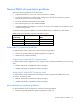
IMPORTANT: Processor socket 1 must always be populated. If processor socket 1 is empty, the
workstation blade does not power up.
Before installing a processor, you must remove any previously installed WS460c Graphics Expansion Blade
access panel and blade.
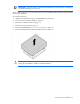
To install the component:
1. Update the system ROM using any standard ROM flash mechanism.
2. Power down the workstation blade (on page 14).
3. Remove the workstation blade (on page 15).
4. Remove the access panel (on page 16).
5. Remove all DIMM baffles ("Remove the DIMM baffle" on page 16).
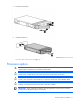
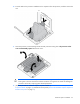
6. Remove the heatsink blank. Retain the heatsink blank for future use.
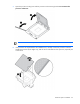
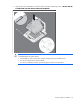
CAUTION: Failure to completely open the processor locking lever prevents the processor from
seating during installation, leading to hardware damage.