
HP ProLiant WS460c G6 Workstation Blade with WS460c Graphics Expansion Blade Maintenance and Service Guide

Removal and replacement procedures 74
b.
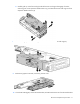
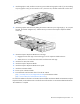
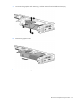
Disconnect power cables from the graphics board.
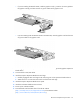
c. Remove the two T-15 screws (1) securing the front of the PCIe card cage.
d. Carefully pull up on the front and right sides of the PCIe card cage to disengage it from the
anchoring pins on the expansion blade enclosure, and then lift the PCIe card cage out of the
expansion blade enclosure (2).