
HP ProLiant WS460c G6 Workstation Blade with WS460c Graphics Expansion Blade Maintenance and Service Guide

Removal and replacement procedures 73
Installing the NVIDIA Quadro 4000, 5000, and
6000 graphics cards
Required tools for this procedure:
• T-10/T-15 Torx screwdriver (provided inside the server)
• HP Insight Diagnostics software
To install the graphics card:
1. Power down the workstation blade (on page 26).
2. Remove the workstation blade (on page 28).
3. Remove the Graphics Expansion Blade access panel.
4. Remove the Graphics Expansion Blade.
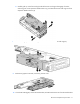
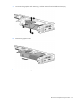
5. Disconnect the four PCIe/SAS cables.
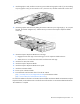
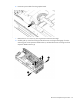
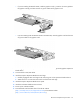
6. Remove the Graphics Expansion Blade PCIe card cage.
a. Disconnect the four PCIe/SAS cables from the PCIe riser board.