
HP ProLiant WS460c G6 Workstation Blade with WS460c Graphics Expansion Blade Maintenance and Service Guide

Removal and replacement procedures 42
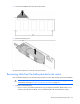
DIMM baffles
To remove the component:
1. Power down the workstation blade (on page 26).
2. Remove the workstation blade (on page 28).
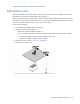
3. Remove the access panel ("Access panel" on page 28).
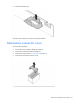
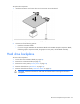
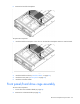
4. Remove the DIMM baffle.
To replace the component, reverse the removal procedure.
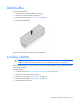
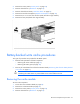
Installing a DIMM
CAUTION: To avoid damage to the hard drives, memory, and other system components, the air
baffle, drive blanks, and access panel must be installed when the server is powered up.
Before installing a DIMM, you must remove any previously installed WS460c Graphics Expansion Blade
access panel and blade.
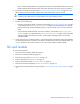
To install a DIMM:
1. Power down the server ("Power down the workstation blade" on page 26).
2. Remove the workstation blade (on page 28).
3. Remove the access panel ("Access panel" on page 28).
4. Remove all DIMM baffles ("DIMM baffles" on page 42).
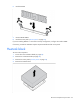
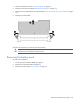
5. Open the DIMM slot latches.