
HP ProLiant WS460c G6 Workstation Blade with WS460c Graphics Expansion Blade Maintenance and Service Guide

Removal and replacement procedures 29
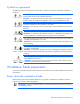
CAUTION:
To prevent damage to electrical components, properly ground the workstation blade
before beginning any installation procedure. Improper grounding can cause ESD.
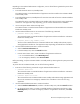
To replace the component:
1. Place the access panel on top of the workstation blade with the hood latch open. Allow the panel to
extend past the rear of the workstation blade approximately 0.8 cm (0.2 in).
2. Engage the anchoring pin with the corresponding hole in the latch.
3. Push down on the hood latch. The access panel slides to a closed position.
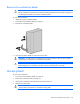
WS460c Graphics Expansion Blade access panel
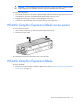
To remove the access panel:
1. Lift the access panel latch (1). The access panel slides to the rear (2).
2. Remove the access panel.
To reinstall the access panel, follow these steps in reverse order.
WS460c Graphics Expansion Blade
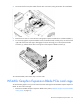
To remove the blade:
1. Remove the WS460c Graphics Expansion Blade access panel ("WS460c Graphics Expansion Blade
access panel" on page 29).