
HP ProLiant SL4500 Series Chassis Maintenance and Service Guide

Component identification 80
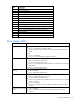
LED behavior Definition
Solid amber
Both of the following conditions apply:
•
Drive is failed.
•
Drive is not selected.
Flashing amber at 1Hz
50% duty cycle
All of the following conditions apply:
•
Drive is in a predictive failure state.
•
Drive is not failed.
•
Drive is not selected.
Alternating amber and
green at 1 Hz 50% duty
cycle
•
Drive is failed.
•
Drive is in a predictive failure state.
In either instance, the drive is selected.
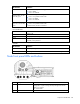
Drive health LEDs
LED behavior Definition
Off
System is off.
Green
Storage system health is good.
Amber
System requires service or a fault is detected. Check drives, drive backplane, RAID
controller, and system fans.
UID LEDs
LED behavior Definition
Off
Normal operating mode
Blue flashing
Drive segment is selected; drive is in locate mode. Firmware is being flashed.
Node front panel LEDs and buttons
Item Description Status
1
UID LED button Blue = Activated
Flashing blue = System is being remotely managed or firmware
update is in progress.
Off = Deactivated
2
Node release button —