
HP ProLiant SL4500 Series Chassis Maintenance and Service Guide

Removal and replacement procedures 73
4.
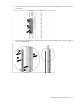
On the front of the rack, remove the two screws from each of the mounting brackets, and then remove
the brackets.
5. Remove the four flathead screws, marked number 2, that secure the adapter rails to the rack, and then
remove the adapter rails.
To replace the component, reverse the removal procedure.