
HP ProLiant SL4500 Series Chassis Maintenance and Service Guide


Removal and replacement procedures 72
Rack rail adapter kit
WARNING: The chassis is very heavy. To reduce the risk of personal injury or damage to the
equipment:
• Observe local occupational health and safety requirements and guidelines for manual
material handling.
• Remove all installed components from the chassis before installing or moving the chassis.
• Use caution and get help to lift and stabilize the chassis during installation or removal,
especially when the chassis is not fastened to the rack.
WARNING: To reduce the risk of personal injury or damage to the equipment, you must
adequately support the chassis during installation and removal.
WARNING: Always use at least two people to lift the chassis into the rack. If the chassis is being
loaded into the rack above chest level, a third person must assist with aligning the chassis with the
rails while the other two people support the weight of the chassis.
WARNING: Only authorized technicians trained by HP should attempt to replace this
component.
Rack rail adapters are only available on racks that are pre-configured in the factory.
To remove the component:
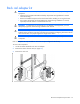
1. Locate the chassis attached to the rack rail adapter.
2. Remove the chassis from the rack (on page 38).
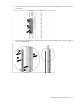
3. Remove the rack rails.