
HP ProLiant SL4500 Series Chassis Maintenance and Service Guide

Removal and replacement procedures 40
Remove the access panel
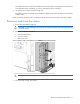
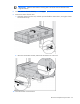
1. Release the access panel latch.
2. Slide the access panel back about 1.5 cm (0.5 in).
3. Lift and remove the access panel.
NOTE: Turn the access panel over to locate the hood labels. These labels provide information on
installing various options, flexible memory configurations, LED status indicators, and switch
settings.
Install the access panel
WARNING: To reduce the risk of personal injury from hot surfaces, allow the drives and the
internal system components to cool before touching them.
CAUTION: To prevent damage to electrical components, properly ground the node before
beginning any installation procedure. Improper grounding can cause ESD.
CAUTION: Do not operate the chassis with the access panel open or removed. Operating the
chassis in this manner results in improper airflow and improper cooling that can lead to thermal
damage.
To install the component:
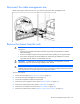
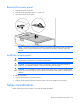
1. Place the access panel on top of the chassis.
2. Slide the access panel toward the front of the chassis. The access panel locks into position.
Safety considerations
Before performing service procedures, review all the safety information.