
HP ProLiant SL4500 Series Chassis Maintenance and Service Guide

Removal and replacement procedures 39
IMPORTANT: Label the drives before removing them. The drives must be returned to their
original locations.
8. Remove all drives from the chassis ("Drive" on page 51).
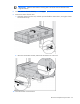
9. Remove the chassis from the rack:
a. Extend the chassis from the rack, and then push and hold the release levers, moving the chassis
forward until it stops.
b. Move the release tabs forward, and then lift the chassis out of the rack.
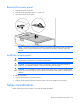
10. Place the chassis on a flat surface.