
HP ProLiant SL4500 Series Chassis Maintenance and Service Guide

Removal and replacement procedures 38
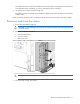
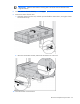
Disconnect the cable management arm
Before removing the chassis from the rack, you must first remove the cable management arm.
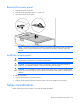
Remove the chassis from the rack
WARNING: The chassis is very heavy. To reduce the risk of personal injury or damage to the
equipment:
• Observe local occupational health and safety requirements and guidelines for manual
material handling.
• Remove all installed components from the chassis before installing or moving the chassis.
• Use caution and get help to lift and stabilize the chassis during installation or removal,
especially when the chassis is not fastened to the rack.
WARNING: To reduce the risk of personal injury or damage to the equipment, you must
adequately support the chassis during installation and removal.
WARNING: Always use at least two people to lift the chassis into the rack. If the chassis is being
loaded into the rack above chest level, a third person must assist with aligning the chassis with the
rails while the other two people support the weight of the chassis.
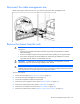
To remove the chassis:
1. Power down the nodes ("Power down the node" on page 36).
2. Disconnect the cable management arm (on page 38).
3. Disconnect all peripheral cables from the chassis.
4. Remove the power supplies from the chassis ("Power supplies" on page 43).
5. Remove the system fans from the chassis ("System fans" on page 42).
6. Remove the I/O modules from the chassis ("I/O module" on page 44).
7. Remove the nodes from the chassis ("Remove a node from the chassis" on page 37).