
HP ProLiant SL4500 Series Chassis Maintenance and Service Guide

Removal and replacement procedures 37
This method forces the node to enter standby mode without properly exiting applications and the OS.
If an application stops responding, you can use this method to force a shutdown.
• Use a virtual power button selection through iLO.
This method initiates a controlled remote shutdown of applications and the OS before the node enters
standby mode.
Before proceeding, verify the node is in standby mode by observing that the system power LED is amber.
Remove a node from the chassis
1. Power down the node (on page 36).
CAUTION: To avoid damage to the node, always support the bottom of the node when removing
it from the chassis.
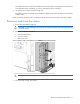
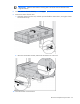
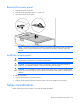
2. Remove the node from the chassis:
a. Press the release button.
b. Lower the handle.
c. Remove the node.
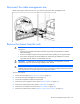
CAUTION: To avoid damage to the device, do not use the removal handle to carry it.
3. Place the node on a flat, level surface.