
Open Source Object Storage for Unstructured Data: Ceph on HP ProLiant SL4540 Gen8 Servers


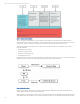
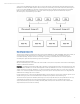
Table Of Contents
- Executive summary
- Introduction
- Overview
- Solution components
- Workload testing
- Configuration guidance
- Bill of materials
- Summary
- Appendix A: Sample Reference Ceph Configuration File
- Appendix B: Sample Reference Pool Configuration
- Appendix C: Syntactical Conventions for command samples
- Appendix D: Server Preparation
- Appendix E: Cluster Installation
- Naming Conventions
- Ceph Deploy Setup
- Ceph Node Setup
- Create a Cluster
- Add Object Gateways
- Apache/FastCGI W/100-Continue
- Configure Apache/FastCGI
- Enable SSL
- Install Ceph Object Gateway
- Add gateway configuration to Ceph
- Redeploy Ceph Configuration
- Create Data Directory
- Create Gateway Configuration
- Enable the Configuration
- Add Ceph Object Gateway Script
- Generate Keyring and Key for the Gateway
- Restart Services and Start the Gateway
- Create a Gateway User
- Appendix F: Newer Ceph Features
- Appendix G: Helpful Commands
- Appendix H: Workload Tool Detail
- Glossary
- For more information
Reference Architecture | Product, solution, or service
• 1GbE Networking running on an HP 2920 switch, carrying HP Integrated Light-Out (iLO) and corporate management
traffic
• Rack and power components
In this configuration the HP ProLiant SL4540 Gen8 Servers are ‘object storage nodes’; these are servers where scale-out
storage hard drives reside. The HP ProLiant DL360p Gen8 Servers are ‘management nodes’ for the cluster. The HP ProLiant
DL360p Gen8 Servers provide the part of the solution that maintains cluster state and object gateways to access the cluster
storage through S3/Swift REST APIs. Given a RESTful interface, traffic generators can come from all kind of clients but in this
test a benchmark tool run on x86 Linux boxes provides sample workload.
5