
Open Source Object Storage for Unstructured Data: Ceph on HP ProLiant SL4540 Gen8 Servers



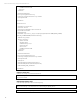

Table Of Contents
- Executive summary
- Introduction
- Overview
- Solution components
- Workload testing
- Configuration guidance
- Bill of materials
- Summary
- Appendix A: Sample Reference Ceph Configuration File
- Appendix B: Sample Reference Pool Configuration
- Appendix C: Syntactical Conventions for command samples
- Appendix D: Server Preparation
- Appendix E: Cluster Installation
- Naming Conventions
- Ceph Deploy Setup
- Ceph Node Setup
- Create a Cluster
- Add Object Gateways
- Apache/FastCGI W/100-Continue
- Configure Apache/FastCGI
- Enable SSL
- Install Ceph Object Gateway
- Add gateway configuration to Ceph
- Redeploy Ceph Configuration
- Create Data Directory
- Create Gateway Configuration
- Enable the Configuration
- Add Ceph Object Gateway Script
- Generate Keyring and Key for the Gateway
- Restart Services and Start the Gateway
- Create a Gateway User
- Appendix F: Newer Ceph Features
- Appendix G: Helpful Commands
- Appendix H: Workload Tool Detail
- Glossary
- For more information

Reference Architecture | Product, solution, or service
ssh ${tgtsys} sudo parted -s ${tgtdrv} mklabel gpt
p_layout=( 0G 4G 8G 12G 16G )
start_idx=0
end_idx=1
while [ ${end_idx} -lt ${#p_layout[@]} ]; do
ssh ${tgtsys} sudo parted ${tgtdrv} -s mkpart cephjournal${end_idx} ${p_layout[${start_idx}]} ${p_layout[${end_idx}]}
(( start_idx=end_idx ))
(( end_idx++ ))
done
Sample script for adding OSDs to the cluster.
#!/bin/bash
destbox=${1}
if [ -z "${destbox}" ]; then
echo "No target system."
exit 1
fi
partdev=$(echo sd{a..t} )
journaldev=( $(echo sd{u..y}{1..4}) )
journal_idx=0
for devid in ${partdev}; do
echo "working on ${devid}"
ssh ${destbox} sudo "parted -s /dev/${devid} mklabel gpt"
ceph-deploy --overwrite-conf osd create ${destbox}:${devid}:${journaldev[${journal_idx}]}
(( journal_idx++ ))
done
Create Admin Node
The server is administered on the same box as the primary monitor/object gateway. Adding read permissions on the admin
keyring and ceph configuration allows cluster administrator operations without having to be root.
ceph-deploy admin hp-cephmon01
sudo chmod +r /etc/ceph/ceph.client.admin.keyring
sudo chmod +r /etc/ceph/ceph.conf
Verify Cluster Health
The cluster should be complete. Check health status of the cluster and cluster state information to make sure the cluster
looks like it should.
ceph health
ceph -s
An example of command output from a healthy cluster configuration:
cloudplay@hp-cephmon02:~$ ceph -s
cluster 8fd2af32-987c-48a7-9a7b-e932bd88024b
health HEALTH_OK
monmap e1: 3 mons at {hp-cephmon01=10.9.25.17:6789/0,hp-cephmon02=10.9.25.18:6789/0,hp-
cephmon03=10.9.25.19:6789/0}, election epoch 8, quorum 0,1,2 hp-cephmon01,hp-cephmon02,hp-cephmon03
osdmap e822: 200 osds: 200 up, 200 in
pgmap v106577: 6336 pgs: 6324 active+clean, 12 active+clean+scrubbing; 12639 GB data, 38329 GB used, 508 TB / 545
TB avail
mdsmap e1: 0/0/1 up
cloudplay@hp-cephmon02:~$ ceph health
HEALTH_OK
Default Object Storage Placement Group Count
The majority of placement groups should lie in the pools with the most RADOS objects. In an object storage focused cluster,
this pool will default to .rgw.buckets. Using the cluster tuning guidelines for placement groups, this step is a good place to
43