
Open Source Object Storage for Unstructured Data: Ceph on HP ProLiant SL4540 Gen8 Servers

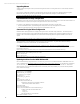

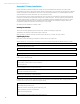
Table Of Contents
- Executive summary
- Introduction
- Overview
- Solution components
- Workload testing
- Configuration guidance
- Bill of materials
- Summary
- Appendix A: Sample Reference Ceph Configuration File
- Appendix B: Sample Reference Pool Configuration
- Appendix C: Syntactical Conventions for command samples
- Appendix D: Server Preparation
- Appendix E: Cluster Installation
- Naming Conventions
- Ceph Deploy Setup
- Ceph Node Setup
- Create a Cluster
- Add Object Gateways
- Apache/FastCGI W/100-Continue
- Configure Apache/FastCGI
- Enable SSL
- Install Ceph Object Gateway
- Add gateway configuration to Ceph
- Redeploy Ceph Configuration
- Create Data Directory
- Create Gateway Configuration
- Enable the Configuration
- Add Ceph Object Gateway Script
- Generate Keyring and Key for the Gateway
- Restart Services and Start the Gateway
- Create a Gateway User
- Appendix F: Newer Ceph Features
- Appendix G: Helpful Commands
- Appendix H: Workload Tool Detail
- Glossary
- For more information

Reference Architecture | Product, solution, or service
Appendix C: Syntactical Conventions for command samples
Angle bracketed text indicates a substitution for a literal value. Example: ssh < host name > would indicate to substitute the
host name of the target Ceph node when executing ssh commands.
The use of single quotes with an OS command indicates shorthand for a command. Example: ‘ceph –s’. This does not
typically attempt to indicate permissions or context as it’s used when that’s assumed known, or reference to the command
is all the needed context (i.e. a command might require a preceding ‘sudo’).
A breakout of detailed example OS text (command line or configuration file) is specified in a box.
Sample Text
A callout for optional OS text (something that is important to know but may not apply to all users) is specified in a colored
box.
Important Note
35