
HP ProLiant SL4540 Gen8 Server Node Maintenance and Service Guide
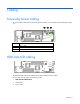
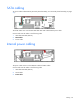
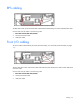
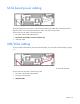
Table Of Contents
- HP ProLiant SL4540 Gen8 Server Node Maintenance and Service Guide
- Abstract
- Notice
- Contents
- Customer self repair
- Illustrated parts catalog
- Removal and replacement procedures
- Troubleshooting
- Diagnostic tools
- Component identification
- Cabling
- Specifications
- Acronyms and abbreviations
- Documentation feedback
- Index
Cabling 59
RPS cabling
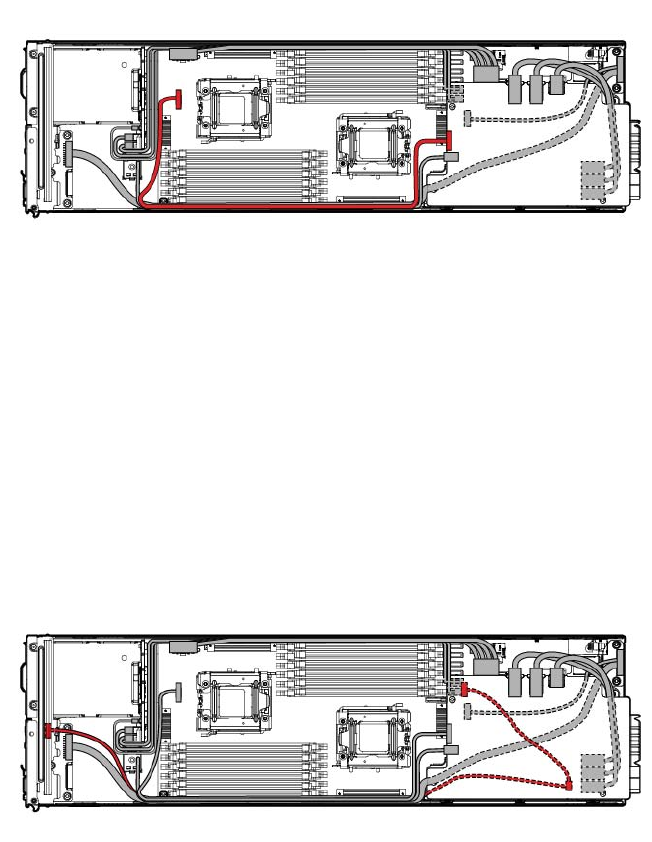
The RPS cable routes with the front LED cable underneath the SATA board power cable and USB/VGA cable.
Connect and route the cables in the following order:
1. RPS cable and front LED cable (bottom)
2. SATA power board cable
3. USB/VGA cable
Front I/O cabling
To access cables underneath the personality board assembly, see "Personality board assembly (on page
37)."
The front LED cable routes with the RPS cable underneath the SATA board power cable and the USB/VGA
connector cable.
Connect and route the cables in the following order:
1. RPS cable and front LED cable (bottom)
2. SATA power board cable
3. USB/VGA cable