
HP ProLiant SL4540 Gen8 Server Node Maintenance and Service Guide
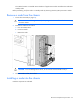
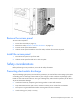
Table Of Contents
- HP ProLiant SL4540 Gen8 Server Node Maintenance and Service Guide
- Abstract
- Notice
- Contents
- Customer self repair
- Illustrated parts catalog
- Removal and replacement procedures
- Troubleshooting
- Diagnostic tools
- Component identification
- Cabling
- Specifications
- Acronyms and abbreviations
- Documentation feedback
- Index

Removal and replacement procedures 22
Removal and replacement procedures
Required tools
You need the following items for some procedures:
• T-10 Torx screwdriver
• T-15 Torx screwdriver
• HP Insight Diagnostics software ("HP Insight Diagnostics" on page 50)
Preparation procedures
To access some components and perform certain service procedures, you must perform one or more of the
following procedures:
• Power down the nodes ("Power down the node" on page 22).
If you must remove the chassis from a rack or a non-hot-plug component from the chassis or node, then
you must power down the nodes.
• Remove the nodes from the chassis ("Remove a node from the chassis" on page 23).
If the rack environment, cabling configuration, or the chassis location in the rack creates unstable
conditions, then remove the node from the chassis.
• Remove the access panel (on page 24).
• Install the access panel (on page 24).
Power down the node
Before powering down the node for any upgrade or maintenance procedures, perform a backup of critical
server data and programs.
IMPORTANT: When the n
ode is in standby mode, auxiliary power is still being provided to the
system.
To power down the node, use one of the following methods:
• Press and release the Power On/Standby button.
This method initiates a controlled shutdown of applications and the OS before the node enters standby
mode.
• Press and hold the Power On/Standby button for more than 4 seconds to force the node to enter
standby mode.
This method forces the node to enter standby mode without properly exiting applications and the OS.
If an application stops responding, you can use this method to force a shutdown.
• Use a virtual power button selection through iLO.