
HP ProLiant SL4500 server series overview
Technical white paper| HP ProLiant SL4500 server series
7
Server Management
The HP SL4500 server series offers several management tools.
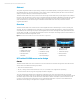
HP iLO Management Engine (HP SL4540 only)
The HP SL4540 server series includes the HP iLO4.0 management processor with HP Agentless Management, HP Active
Health System, and HP Automated Energy Optimization.
• HP Agentless Management: the base hardware monitoring and alerting capability built into the system (running on the HP
iLO chip set).
• HP Active Health System: provides continuous, proactive health monitoring of over 1600 system parameters, and logs
configuration changes to assist problem resolution.
• HP iLO Mobile App: allows immediate, secure access to your server from your smartphone or tablet device.
• HP iLO multi-language support: the HP iLO GUI is available in English, Japanese, and simplified Chinese.
• HP 3D Sea of Sensors: thermal sensors on HP-branded networking and storage PCI cards, backplanes, and mezzanine
cards, provides a view of system cooling that automatically tracks thermal activity across the server. When temperatures
get too high, HP Automated Energy Optimization controls and adjusts the fans to reduce energy usage.
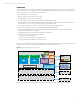
Intelligent Provisioning
ProLiant Gen8 versions of the SL4500 server series include Intelligent Provisioning, which replaces SmartStart CDs for
server setup and configuration. Instead of using separate CDs to boot and load the configuration utilities, these systems
include an on-board flash chip that is pre-loaded with the required software. When a user presses the F10 key during server
start-up, the system boots from the pre-loaded flash chip and runs the Intelligent Provisioning software.
Intelligent Provisioning includes all the configuration utilities of SmartStart, a revised and simplified user interface (UI), and
new features including the capability to do the following:
• Connect directly to HP.com, perform firmware updates, and install an OS in the same step.
• Provision a server remotely using HP iLO 4.
• Register for support remotely.
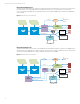
The revised UI in particular includes new capabilities that streamline the provisioning process with the following choices:
• A new “recommended install” for one-click fast installation using preset defaults and automatic software and firmware
updates.
• A “customized install” using a simplified start-to-finish wizard for performing network setup, remote support registration,
hardware and RAID configuration, OS installation, and software and firmware updates.
• A more simplified “manual install” that automates the driver search process.
Intelligent Provisioning removes the guesswork in deploying ProLiant Gen8 servers by providing all the tools, software, and
drivers that you need.