HP ProLiant SL250s Gen8 Server User Guide
Manuals
Brands
HP Manuals
Server
HP ProLiant SL250s Gen8 E5-2665 2P 8GB 2U Right Tray Server
61
62
63
64
65
66
67
68
69
70
Hardware
options installation
64
9.
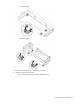
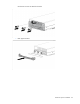
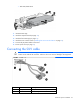
Connect the power and power capping cable to the
GPU.
10.
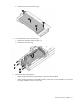
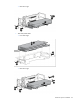
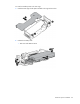
Install the GPU into the GPU cage, and then secure it with the T
-
10 screws:
o
Tesla K10 and GRID K2 G
PUs
—
Front GPU cage
1
...
...
62
63
64
65
66
...
...
115