
HP ProLiant SL250s Gen8 Server User Guide

Hardware options installation 56
10.
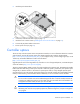
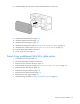
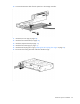
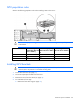
Connect the Mini-SAS cable from the option kit to the storage controller.
11. Install the PCI riser cage (on page 24).
12. Install the front GPU bracket (on page 20).
13. Install the interposer board (on page 19).
14. Install the front GPU cage (on page 17).
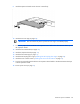
15. Install the SFF hot-plug drive cage ("Installing the SFF hot-plug drive cage" on page 23).
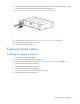
16. Disconnect the existing Mini-SAS cable from the drive cage.