
HP ProLiant SL250s Gen8 Server User Guide

Hardware options installation 44
9.
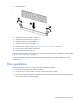
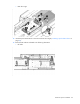
Install the DIMM.
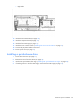
10. Install the processor air baffle (on page 21).
11. Install the front GPU bracket (on page 20).
12. Install the interposer board (on page 19).
13. Install the front GPU cage (on page 17).
14. Install the server into the chassis ("Installing the server into the chassis" on page 31).
15. Connect all peripheral cables to the server.
16. Power up the server (on page 15).
If you are installing DIMMs in online spare, mirrored, or lock-step configuration, configure this mode in RBSU
("HP ROM-Based Setup Utility" on page 87).
For more information about LEDs and troubleshooting failed DIMMs, see "Systems Insight Display LED
combinations."
Drive guidelines
When adding drives to the server, observe the following general guidelines:
• The system automatically sets all device numbers.
• If only one drive is used, install it in the bay with the lowest device number.
• To provide the greatest storage space efficiency when drives are grouped together into the same drive
array, drives must be the same capacity.