
HP ProLiant SL250s Gen8 Server User Guide

Operations 24
b.
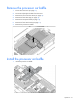
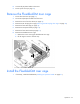
Lift the cage to remove it from the tray.
Install the PCI riser cage
1. If necessary, install the expansion boards ("Installing an expansion board" on page 57).
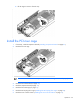
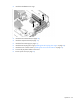
2. Install the PCI riser cage.
IMPORTANT: The server does not power up if the PCI riser cage is not seated properly.
3. Install the front GPU bracket (on page 20).
4. Install the interposer board (on page 19).
5. Install the front GPU cage (on page 17).
6. Install the SFF hot-plug drive cage ("Installing the SFF hot-plug drive cage" on page 23).
7. Install the server into the chassis ("Installing the server into the chassis" on page 31).