
HP ProLiant SL250s Gen8 Server User Guide



Hardware options installation 72
8.
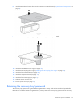
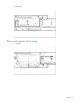
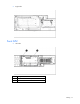
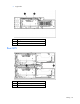
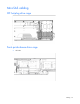
Install the TPM board. Press down on the connector to seat the board ("System board components" on
page 9).
9. Install the TPM security rivet by pressing the rivet firmly into the system board.
10. Install the FlexibleLOM riser cage (on page 25).
11. Install the SFF hot-plug drive cage ("Installing the SFF hot-plug drive cage" on page 23).
12. Install the front GPU bracket (on page 20).
13. Install the interposer board (on page 19).
14. Install the front GPU cage (on page 17).
15. Slide the server into the rack.
16. Power up the server (on page 15).
Retaining the recovery key/password
The recovery key/password is generated during BitLocker™ setup, and can be saved and printed after
BitLocker™ is enabled. When using BitLocker™, always retain the recovery key/password. The recovery