
HP ProLiant t2500 Chassis Setup and Installation Guide




Cabling and powering up the chassis 28
Cabling and powering up the chassis
Cabling the chassis
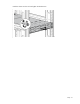
After all system hardware is installed, cable the components. See the HP ProLiant SL Servers Site Planning
Guide on the HP website (http://www.hp.com) for additional cabling and site planning requirements.
WARNING: To reduce the risk of electric shock or injury due to high-current electrical energy, be
sure that all power is completely disconnected at the source before beginning any power
connections to the power bus bars or power bus box.
WARNING:
Be sure that all circuit breakers are locked in the off position before connecting any
power components.
CAUTION: To avoid damaging the fiber cables, do not drape cables from one side of the rack
to the other and do not run cables over a hard corner or edge.
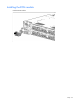
Power up the nodes
The SL Chassis Firmware initiates an automatic power-up sequence when the nodes are installed. If the
default setting is changed, use one of the following methods to power up each node:
• Use a virtual power button selection through iLO.
• Press and release the Power On/Standby button.
When the node goes from the standby mode to the full power mode, the node power LED changes from
amber to green.
For more information about iLO, see the HP website (http://www.hp.com/go/ilo).