
HP ProLiant t2500 Chassis Setup and Installation Guide






Setup 17
Setup
Installation overview
To set up and install the chassis:
1. Set up and install the rack. For more information, see the documentation that ships with the rack.
2. Prepare the chassis ("Preparing the chassis" on page 17).
3. Install the chassis into the rack ("Installing the chassis" on page 20).
4. Install the chassis components ("Component installation" on page 22) into the chassis.
5. Connect the chassis components ("Cabling and powering up the chassis" on page 28) in the chassis.
Preparing the chassis
Before installing the chassis into the rack, you must remove the nodes, the drives, and the power supplies.
Because a fully populated chassis is heavy, removing these components facilitates moving and installing the
chassis.
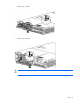
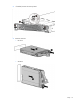
1. Remove the RCM module and then remove the power supplies from the chassis.
CAUTION: To avoid damage to the node, always support the bottom of the node when removing
it from the chassis.
2. Remove the nodes.