
HP ProLiant t2500 Chassis Setup and Installation Guide




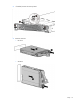


Component and LED identification 16
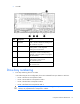
Item LED Status Definition
4
Drive status Solid green The drive is a member of one or more logical drives.
Flashing green The drive is rebuilding or performing a RAID migration, strip size
migration, capacity expansion, or logical drive extension, or is
erasing.
Flashing
amber/green
The drive is a member of one or more logical drives and predicts
the drive will fail.
Flashing amber The drive is not configured and predicts the drive will fail.
Solid amber The drive has failed.
Off The drive is not configured by a RAID controller.
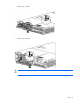
Power supply LED
Power LED Status
Off
•
No AC power to power supply units. Check the AC power cord.
•
AC is present. Standby output is on; output is disabled.
•
Power supply failure (includes overvoltage and overtemperature)
Green
AC is present and main 12 V output is enabled.