
HP ProLiant t2500 Chassis Setup and Installation Guide




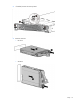


Component and LED identification 13
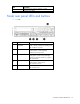
• 2U node
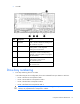
Item Description Status
1
Node power
button/LED
Green = Node is powered on.
Amber = Node is off and has standby power.
Off = Node has no power.
2
Health LED Green = Normal.
Flashing amber = Node degraded.
Flashing red = Node critical.
3
UID LED Blue = Activated.
Flashing blue = Node is remotely being
managed, or firmware update is in progress.
Off = Deactivated.
4
NIC status LED Green = Activity exists.
Flashing green = Activity exists.
Off = No activity exists.
5
NIC link LED Green = Link exists.
Off = No link exists.
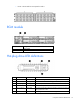
Drive bay numbering
• Drive bay numbering for four 1U nodes
In an 8-drive bay LFF drive configuration, drives are numbered from top to bottom in each box.
o Drives in the first box correspond to node 1.
o Drives in the second box correspond to node 2.
o Drives in the third box correspond to node 3.
o Drives in the fourth box correspond to node 4.
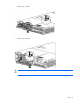
CAUTION: To prevent improper cooling and thermal damage, do not operate the chassis unless
all bays are populated with a component or a blank.