
HP ProLiant SL210t Gen8 Plus Server Maintenance and Service Guide





Component identification 64
o
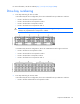
Drives in the third and fourth box correspond to node 3.
In a 24-drive bay SFF drive configuration, drives are numbered from left to right in each box.
o Drives in the first box correspond to node 1.
o Drives in the second box correspond to node 3.
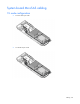
Hot-plug drive LED definitions
Item LED Status Definition
1
Locate Solid blue The drive is being identified by a host application.
Flashing blue The drive carrier firmware is being updated or requires an update.
2
Activity ring Rotating green Drive activity
Off No drive activity
3
Do not remove Solid white Do not remove the drive. Removing the drive causes one or more of
the logical drives to fail.
Off Removing the drive does not cause a logical drive to fail.
4
Drive status Solid green The drive is a member of one or more logical drives.
Flashing green
The drive is rebuilding or performing a RAID migration, strip size
migration, capacity expansion, or logical drive extension, or is
erasing.