
HP ProLiant SL210t Gen8 Plus Server Maintenance and Service Guide






Removal and replacement procedures 24
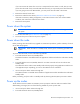
Removing a 2U node
CAUTION: To avoid damage to the device, do not use the removal handle to carry it.
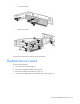
4. Place the node on a flat, level surface.
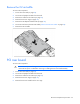
Remove the PCI riser cage
1. Power down the node (on page 22).
2. Disconnect all peripheral cables from the node.
3. Remove the node from the chassis (on page 23).
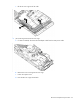
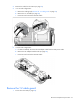
4. (1U node only) Remove the PCI riser cage:
a. Remove the screw securing the riser cage.
b. Press the PCI riser cage release latch.