
HP ProLiant SL210t Gen8 Plus Server Maintenance and Service Guide






Removal and replacement procedures 23
When the node goes from the standby mode to the full power mode, the node power LED changes from
amber to green.
For more information about iLO, see the HP website (http://www.hp.com/go/ilo).
Remove the node from the chassis
CAUTION: To avoid damage to the node, always support the bottom of the node when removing
it from the chassis.
1. Power down the node (on page 22).
2. Disconnect all peripheral cables from the node.
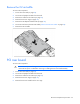
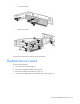
3. Remove the node from the chassis:
a. Press the release button.
b. Lower the handle.
c. Remove the node.
Removing a 1U node