
HP ProLiant SL170z G6 Server Maintenance and Service Guide




Contents 69
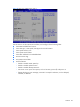
Advanced Menu
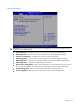
Figure 55 Advanced menu of the BIOS Setup Utility
WARNING: Incorrect settings may cause the server to malfunction. To correct the settings, press F9
key to restore the default settings.
• CPU Configuration – Configure and view the current CPU configuration and settings.
• IDE Configuration – Use this screen to select options for the IDE Configuration Settings.
• I/O Device Configuration – Configure the serial port settings of the server.
• ACPI Configuration – Use this screen to select options for the ACPI Configuration settings.
• IPMI Configuration – Configure the Intelligent Platform Management Interface (IPMI) settings.
• USB Configuration --- Configure the USB settings of the server.
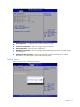
• Remote Access Configuration – Select console redirection in the left frame of the screen to go to
the sub menu for that item. Console redirection Setup options are described in this section.
• PCI BUS Configuration –Use this screen to select options for PCI Express Devices.
• Power Configuration –Use this screen to select options for the Power Configuration.