
HP ProLiant SL170z G6 Server Maintenance and Service Guide




Contents 61
Front Panel LED Indicators
This section contains illustration and descriptions of internal and external status LED indicators located
on the front panel. These LED indicators aid in problem diagnosis by indicating the status of system
components and operations of the server. The front panel LED indicators allow constant monitoring of
basic system functions while the server is operating.
Power LED Indicator
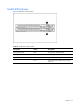
The power status of the server is indicated by the bicolor LED on the front panel.
Figure 48 Power LED indicator locations
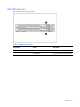
Table 5
Power/system health LED indicator status
Component
Status
Description
Power LED indicator Steady green The server is operating normally.
Steady amber The server is system off or in hibernation with
AC power.
Off The server is system off without AC power.