
HP ProLiant SL170z G6 Server Maintenance and Service Guide





Contents 55
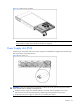
Figure 41 Removing the power supply
System Fan
The server has four system fans located on the chassis’ rears fan cage. The figure below identifies the
system fans by their device number and shows their corresponding cable connections.
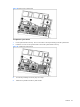
Figure 42 System fan connection
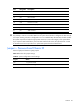
Device number
Connector
System fan 1 J6 on the AC power board
System fan 2 J8 on the AC power board
System fan 3 J10 on the AC power board
System fan 4 J11 on the AC power board, optional
A new system fan can be installed to allow the server to operate properly in case a default system fan
becomes defective.