
HP ProLiant SL170z G6 Server Maintenance and Service Guide


Contents 49
IPMI Card
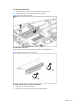
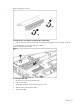
To remove the IPMI card:
1. Unfasten the screws mounting the IPMI card.
2. Unplug the IPMI module vertically to release it from the connector.
3. Unfasten the screw to separate the IPMI card.
4. Reinstall the IPMI bracket back to the tray and secure it with screws.
Figure 30 Removing the IPMI card
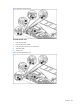
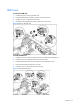
To install the IPMI card:
1. Unfasten the screws on the front panel and remove the IPMI bracket from the tray.
2. Unfasten the screw to separate the IPMI card and its bracket.
3. Install the IPMI bracket from the tray to the IPMI card and fasten the screw.
4. Plug the IPMI module vertically to the connector.
5. Fasten the screws to secure the IPMI card to the tray.
Figure 31 Installing the IPMI card