
HP ProLiant SL170z G6 Server Maintenance and Service Guide


Contents 41
CAUTION: To allow heatsink to draw as much heat as possible from the processor base, there must
be good contact between the heatsink base and the top of the processor. To ensure good contact,
you must apply thermal interface material.
To apply the thermal grease compound:
1. Use the alcohol pads provided in the spare part kit or a clean cloth dipped in rubbing alcohol to clean the
contact surface on the heatsink and on the new processor. Wipe the contact surfaces several times to make
sure that no particles or dust contaminants are evident.
CAUTION: HP recommends using Shin-Etsu X-23-7783D thermal grease compound for your server.
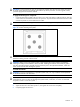
2. Apply all the grease to the top of the processor in the following pattern to insure even distribution.
Figure 16 Processor thermal grease pattern
CAUTION: Never touch the bottom of the processor; any contaminant could prevent the mounting
pads from making contact with the socket.
CAUTION: Applying too much grease creates a gap between the contact surfaces, significantly
reducing the ability of the heatsink to draw out heat. Installing the heatsink with excessive grease
can also cause the grease to spread over the processor pins or the system board base, which can
cause electrical shorts that damage the system.
To install the heatsink:
CAUTION: To prevent overheating or a possible system crash, use only a heatsink model specified
for the HP ProLiant SL170z G6 server.
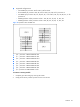
CAUTION: Heatsink screws should be tightened and loosened in opposite sequence. Do not
overtighten the screws as this can damage the system board, connectors, or screws. A maximum
torque of 6-8 in-lb is set for the system.
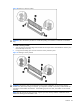
1. Position the heatsink on the processor backplate.
2. Tighten the first screw about three quarters in, then tighten the second screw completely.
3. Completely tighten the first screw.