
HP ProLiant SL170z G6 Server Maintenance and Service Guide



Contents 40
3.
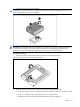
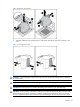
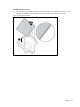
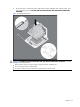
Press and hold the tabs on the processor installation tool to separate it from the processor, and
then remove the tool.
Figure 14 Removing the processor installation tool
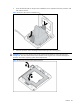
4. Close the processor socket retaining bracket and the processor locking lever.
CAUTION: Be sure to close the processor socket retaining bracket before closing the processor
locking lever. The lever should close without resistance. Forcing the lever closed can damage the
processor and socket, requiring system board replacement.
Figure 15 Closing the processor socket retaining bracket