
HP ProLiant SL170z G6 Server Maintenance and Service Guide



Contents 39
2.
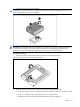
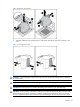
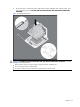
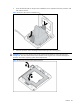
Be sure the tool is oriented correctly. Align the processor installation tool with the socket, and
then install the processor. THE PINS ON THE SYSTEM BOARD ARE VERY FRAGILE AND EASILY
DAMAGED.
Figure 13 Installing the processor
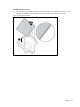
CAUTION: THE PINS ON THE SYSTEM BOARD ARE VERY FRAGILE AND EASILY DAMAGED. To avoid
damage to the system board:
•
Never install or remove a processor without using the processor installation tool.
•
Do not touch the processor socket contacts.
•
Do not tilt or slide the processor when lowering the processor into the socket.