
HP ProLiant SL170z G6 Server Maintenance and Service Guide



Contents 37
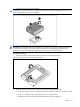
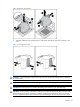
Figure 10 Removing the processor
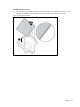
3. Carefully rotate the tool, and then push in and release the tabs to secure the processor in the
tool.
Figure 11 Securing the processor
CAUTION: To avoid damage to the processor, do not touch the bottom of the processor, especially
the contact area.
CAUTION: The pins of the socket are very fragile. Do not bend or damage them.
CAUTION: Place the processor on a static-dissipating work surface or in an anti-static bag.
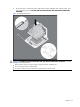
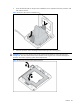
CAUTION: Use the processor install tool to insert the processor into the socket. The processor and
system board spare part kit contains the processor install tool and instructions on how to use the
tool. It is important to follow the instructions to prevent damage to the pins in the processor socket.